
Overview
Kosatka is a content management system written in Go. It renders pages on the server and keeps its data in MySQL or PostgreSQL. A site is built in the admin from the parts below; modules and themes extend it.
The parts of a site
Section titled “The parts of a site”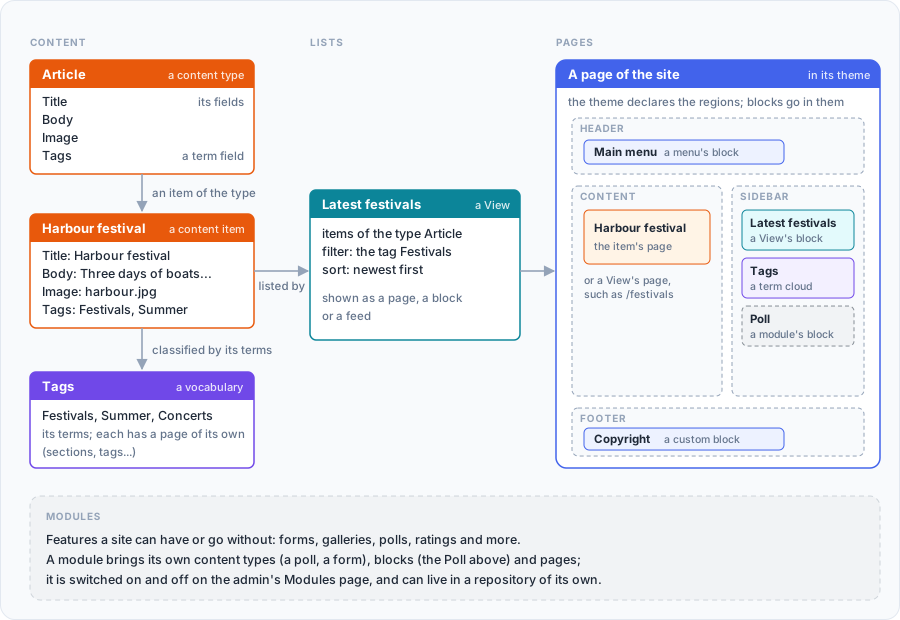
- Content. Every page of content is a node of some content type (an article, a page, an event…). You create the types in the admin and give them fields (the field types).
- Taxonomy. Vocabularies of terms (sections, tags) that classify content. Each term has its own page.
- Views. Lists of content built in the admin: what to show, filters,
sorting, paging. A View can be a page, a block, a list under content,
the list on a term’s page or a tab on user profiles; the front page and
/rss.xmlare Views too. - Blocks and regions. A theme declares regions (header, sidebar, footer…); blocks are placed in them: menus, Views, text, a module’s blocks.
- Menus, addresses and SEO. Menus, URL aliases and redirects, breadcrumbs, title and description templates and search are set up in the admin, per content type where it matters.
- Users. Roles and permissions, registration or invitations, profiles with fields, two-factor sign-in, social login.
- Themes. A theme is a directory with templates, styles and a
manifest (
theme.yaml): its regions, settings and subthemes. Themes can be installed from their own git repositories. - Modules. Features a site can have or go without: forms, galleries, polls, ratings and more. A module is turned on, off or uninstalled on the admin’s Modules page. A module can also live in a repository of its own, and a site builds its binary with it.
Where to start
Section titled “Where to start”- Run Kosatka in Docker - the quickest way to look around: one command, a site with demo content.
- Run it from source - Go and a database of your own.
- After installation - signing in, the admin, the first settings.
- The reference: the
appcommands, the configuration and the content model.