
Running in production
This guide sets up a Kosatka site on a Linux server (Debian or Ubuntu):
the binary as a systemd service, nginx in front of it with HTTPS, the
first install, updates and backups. The examples use the site
www.example.com, the directory /opt/kosatka and the service user
www-data; change them to yours. Several sites on one server share one
engine and update together: see Several sites on one server.
What runs where
Section titled “What runs where”The binary is the whole application: the engine, its database migrations, and the modules’ templates and static files are built into it. Next to it, in its working directory, it reads:
/opt/kosatka/├── kosatka the binary├── prod.yaml the config├── kosatka.env secrets, as environment variables├── web/│ ├── templates/ the engine's templates│ ├── static/ CSS, JavaScript, images (served at /static/)│ └── uploads/ the public files: uploads, image styles├── themes/ the themes└── private/ the private files (sent with forms, of private fields)The two file directories are the site’s data: the service user writes
to them, and a deploy never replaces them. The private one is served
only by the application, with a permission check; the web server must
not serve it. Their paths are files.public_dir and
files.private_dir in the config (see
the configuration).
The application listens on the config’s port on every interface. Keep
that port closed in the firewall: only nginx, on the same host, talks to
it.
The service also runs the site’s background jobs (the scheduled publishing, emptying the trash, the modules’ own), checking every minute what is due: no cron job is needed. Run the binary as one service: several copies would each run them, and each keeps its own caches in memory (the blocks and menus, the settings, the roles’ permissions): a change made through one copy would show in another only after its next refresh, some only after its restart.
1. Prepare the server
Section titled “1. Prepare the server”-
Install nginx and certbot, and a database client for backups:
Terminal window sudo apt updatesudo apt install -y nginx certbot python3-certbot-nginx mariadb-client(For PostgreSQL,
postgresql-clientinstead ofmariadb-client.) -
Open only SSH and the web server’s ports:
Terminal window sudo ufw allow OpenSSHsudo ufw allow 'Nginx Full'sudo ufw enable -
Create an empty database (MySQL 8 or PostgreSQL 16) and a user who owns it, on this server or a managed one. The SQL is in Run from source.
-
Create the directories. The binary and the code belong to root; the service user writes only the file directories:
Terminal window sudo mkdir -p /opt/kosatka/web /opt/kosatka/themessudo install -d -o www-data -g www-data -m 755 /opt/kosatka/web/uploadssudo install -d -o www-data -g www-data -m 750 /opt/kosatka/private
2. Build the binary
Section titled “2. Build the binary”On your machine, in the repository’s directory (Go and git needed):
-
Minify the CSS and JavaScript. The pages link the minified files (
*.min.css,*.min.js), which are not in git, and the build embeds the modules’ ones, so this comes first:Terminal window ./scripts/minify_css.sh && ./scripts/minify_js.sh -
Build for Linux:
Terminal window ./scripts/build_linux_release.shIt writes
./kosatka(linux/amd64) and sets the release number from the latestvX.Y.Zgit tag. By hand, it comes down to:Terminal window version="$(git describe --tags --match 'v[0-9]*' --abbrev=8 2>/dev/null || true)"CGO_ENABLED=0 GOOS=linux GOARCH=amd64 go build \-ldflags "-X github.com/kosatka-cms/kosatka/internal/buildinfo.Version=${version}" \-o kosatka ./cmd/appThe commit the binary was built from is recorded by Go itself when you build in a git checkout. Both show on the status report.
Or skip the build: each release’s
GitHub release has an
archive for linux/amd64 and linux/arm64 with the binary (its version
set), web/templates, web/static (minified, with the modules’ static
files) and themes/ - see Releasing.
Unpack it and upload its contents as below; the modules’ files are in
its web/static/modules/ already.
A site with modules of its own builds its own binary (its main calls
kosatka.Main(); see Using modules). It is
built and deployed the same way.
3. Upload the files
Section titled “3. Upload the files”-
The static files. nginx serves
/static/fromweb/static, so the modules’ static files (inside the binary) and the themes’ (inthemes/<name>/static) are put there too, at the addresses the application serves them at:web/static/modules/<name>/andweb/static/themes/<name>/. Assemble them in a temporary directory and upload it in one go:Terminal window stage="$(mktemp -d)"rsync -a ./web/static/ "$stage/"go run ./cmd/app assets export "$stage"rsync -avz --delete "$stage/" root@example.com:/opt/kosatka/web/static/rm -rf "$stage"app assets export <dir>writes the static files of the modules built into the binary to<dir>/modules/<name>/and the themes’ to<dir>/themes/<name>/, with a.mincopy of each stylesheet and script that has none (seeapp assets). -
The templates and the themes:
Terminal window rsync -avz --delete ./web/templates/ root@example.com:/opt/kosatka/web/templates/rsync -avz --delete ./themes/ root@example.com:/opt/kosatka/themes/Never
rsync --deletethe wholeweb/: it would delete the public files inweb/uploads. -
The binary. Upload it under another name and rename it, so a running service is not disturbed:
Terminal window scp ./kosatka root@example.com:/opt/kosatka/kosatka.newssh root@example.com 'chmod 755 /opt/kosatka/kosatka.new && mv /opt/kosatka/kosatka.new /opt/kosatka/kosatka'
4. The config
Section titled “4. The config”/opt/kosatka/prod.yaml, with no secrets in it
(deploy/prod.yaml.example adds the connection pool, the timeouts and
e-mail; the configuration lists every
key):
env: prodport: 3333public_base_url: https://www.example.com
db:  driver: mysql        # or postgres  host: 127.0.0.1  port: 3306  scheme: kosatka      # the database's name  username: kosatka
session:  secure: true         # the session cookies only over HTTPS
files:  public_dir: ./web/uploads  private_dir: ./private
env: prod- templates are cached, the modules’ files come from the binary, andsession.secret_keyis required: the server refuses to start without it.public_base_url- the site’s canonical address, for absolute links (the sitemap, feeds, e-mails). Leave it out to set the address in the admin, under Site information.session.secure- orSESSION_SECURE=truein the environment.- A database on another host gets TLS by default (
db.tls); see the configuration.
The secrets go to /opt/kosatka/kosatka.env; environment variables
override the file’s values:
DB_PASSWORD=the-database-passwordSESSION_SECRET_KEY=a-long-random-stringSECRETS_KEY=another-long-random-stringMake each key with openssl rand -hex 32. SECRETS_KEY seals the
secrets the site keeps in its database (Secrets in the
database): keep a copy of it
with the database backups - without it they don’t open. The CSS and JavaScript URLs
carry ?v= with the commit the binary was built from, so browsers fetch
the new files after each new binary. STATIC_ASSET_VERSION in this file
replaces it: set it, and change it on each deploy, when the binary was
built outside a git checkout or when you deploy new styles without a new
binary.
The service user reads the config; only root (and systemd) reads the secrets:
sudo chown root:www-data /opt/kosatka/prod.yaml && sudo chmod 640 /opt/kosatka/prod.yamlsudo chown root:root /opt/kosatka/kosatka.env && sudo chmod 600 /opt/kosatka/kosatka.env5. Install the site
Section titled “5. Install the site”The commands take the config from CONFIG_PATH (or -config <file>
before the command) and need the secrets from the env file. On the
server, as root:
cd /opt/kosatkaset -a; . ./kosatka.env; set +aexport CONFIG_PATH=/opt/kosatka/prod.yaml
./kosatka install -site-name "My site" -admin-name admin -admin-email admin@example.com
app install creates the schema, the starter settings and content and
the first administrator, and prints the administrator’s password once.
Without SECRETS_KEY in the environment it also prints a generated one:
add it to /opt/kosatka/kosatka.env and restart the site.
-language, -demo and -modules are in
app install. On a database that has
a site already it refuses.
If you added -demo, its images were written to the public files
directory as root; give them to the service user:
sudo chown -R www-data:www-data /opt/kosatka/web/uploadsA site moved from another server is not installed: restore its database
and file directories instead, then run app migrate (see
Update the site).
6. The systemd service
Section titled “6. The systemd service”The repository’s deploy/systemd/kosatka@.service is a template unit,
one instance per site: kosatka@<site> runs /opt/<site>/<site> from
/opt/<site>, as www-data, with CONFIG_PATH=/opt/<site>/prod.yaml
and the variables of /opt/<site>/<site>.env:
[Unit]Description=Kosatka CMS site %iAfter=network.target
[Service]Type=simpleUser=www-dataGroup=www-dataWorkingDirectory=/opt/%iEnvironment=CONFIG_PATH=/opt/%i/prod.yamlEnvironmentFile=-/opt/%i/%i.envExecStart=/opt/%i/%iRestart=on-failureRestartSec=5
[Install]WantedBy=multi-user.target
With the layout above the instance is kosatka. Copy the unit from the
repository on your machine:
scp deploy/systemd/kosatka@.service root@example.com:/etc/systemd/system/then, on the server, start the service and check it answers:
sudo systemctl daemon-reloadsudo systemctl enable --now kosatka@kosatkacurl -I http://127.0.0.1:3333/On systemctl stop or restart the server finishes the requests in
flight and its background jobs first (timeouts.shutdown, 30 seconds by
default). A server that can’t listen on its port exits with an error,
and systemd’s Restart= starts it again.
7. nginx and HTTPS
Section titled “7. nginx and HTTPS”-
Get a certificate for both names:
Terminal window sudo certbot certonly --nginx -d example.com -d www.example.com -
Save the site as
/etc/nginx/sites-available/kosatka. nginx serves the static and the public files from disk and passes everything else, and any file not on disk, to the application:# HTTP: everything to the canonical HTTPS address.server {listen 80;listen [::]:80;server_name example.com www.example.com;location / {return 301 https://www.example.com$request_uri;}}# HTTPS: the bare domain to the canonical one.server {listen 443 ssl;listen [::]:443 ssl;server_name example.com;ssl_certificate /etc/letsencrypt/live/example.com/fullchain.pem;ssl_certificate_key /etc/letsencrypt/live/example.com/privkey.pem;include /etc/letsencrypt/options-ssl-nginx.conf;ssl_dhparam /etc/letsencrypt/ssl-dhparams.pem;return 301 https://www.example.com$request_uri;}# HTTPS: the site.server {listen 443 ssl;listen [::]:443 ssl;server_name www.example.com;ssl_certificate /etc/letsencrypt/live/example.com/fullchain.pem;ssl_certificate_key /etc/letsencrypt/live/example.com/privkey.pem;include /etc/letsencrypt/options-ssl-nginx.conf;ssl_dhparam /etc/letsencrypt/ssl-dhparams.pem;# The largest upload: at least the largest file size allowed in the# admin (nginx's default is 1 MB; the application reads at most 64 MB).client_max_body_size 16m;# The engine's, the modules' and the themes' static files. Their URLs# carry ?v=, so they may be cached for good.location ^~ /static/ {root /opt/kosatka/web;try_files $uri @app;add_header Cache-Control "public, max-age=31536000, immutable";}# The public files, with the headers the application gives them:# no dotfiles, no scripts, anything but images and PDF downloaded.# An image style not generated yet goes to the application, which# writes the file.location ^~ /uploads/ {root /opt/kosatka/web;location ~ /\. {return 404;}location ~* \.(jpe?g|png|gif|webp)$ {try_files $uri @app;add_header Cache-Control "public, max-age=31536000";add_header X-Content-Type-Options "nosniff" always;add_header Content-Security-Policy "default-src 'none'; img-src 'self' data:; style-src 'unsafe-inline'; sandbox" always;}location ~* \.pdf$ {try_files $uri @app;add_header Cache-Control "public, max-age=31536000";add_header X-Content-Type-Options "nosniff" always;}try_files $uri @app;add_header Cache-Control "public, max-age=31536000";add_header X-Content-Type-Options "nosniff" always;add_header Content-Security-Policy "default-src 'none'; img-src 'self' data:; style-src 'unsafe-inline'; sandbox" always;add_header Content-Disposition "attachment" always;}location / {proxy_pass http://127.0.0.1:3333;proxy_http_version 1.1;proxy_set_header Host $host;proxy_set_header X-Real-IP $remote_addr;proxy_set_header X-Forwarded-For $remote_addr;proxy_set_header X-Forwarded-Proto $scheme;}location @app {proxy_pass http://127.0.0.1:3333;proxy_http_version 1.1;proxy_set_header Host $host;proxy_set_header X-Real-IP $remote_addr;proxy_set_header X-Forwarded-For $remote_addr;proxy_set_header X-Forwarded-Proto $scheme;}}There is no location for the private directory: it is outside
web/, and nothing serves it but the application. -
Enable the site:
Terminal window sudo ln -sf /etc/nginx/sites-available/kosatka /etc/nginx/sites-enabled/sudo nginx -t && sudo systemctl reload nginx
Notes:
- The visitor’s address (for the rate limits, the forms’ submissions,
the error reports) comes from
X-Forwarded-FororX-Real-IPonly when the request comes from a trusted proxy: loopback by default, so nginx on the same host works as is, and a client talking to the application’s port directly can’t set its address. A proxy on another host (nginx in another container, a load balancer) is listed intrusted_proxies(see the configuration). Still keep the application’s port closed from outside. X-Forwarded-Prototells the application the request came over HTTPS: it then sends the HSTS header, and builds the absolute links from the request withhttpswhen no site address is set.- With other
files.public_dirorfiles.public_urlvalues, change the/uploads/location and itsrootto match.
8. Check the site
Section titled “8. Check the site”-
Sign in at
https://www.example.com/loginwith the administrator’s password and change it. -
Open Reports → Status report (
/admin/reports/status). It shows the binary’s release, commit and Go version (a site’s own binary: the engine’s release and, when it was built in a git checkout, the site’s commit), the database and its version, the theme and the modules (folded under their title), and checks: pending migrations, modules installed in the database that the binary doesn’t have, that the public files directory (or bucket) is writable, that the site address is set (e-mails with links aren’t sent without it), the mail transport, the MySQLsql_mode, the in-memory caches’ refresh, the background jobs, and the modules’ own checks. A warning or an error also shows as a bar on the admin’s pages.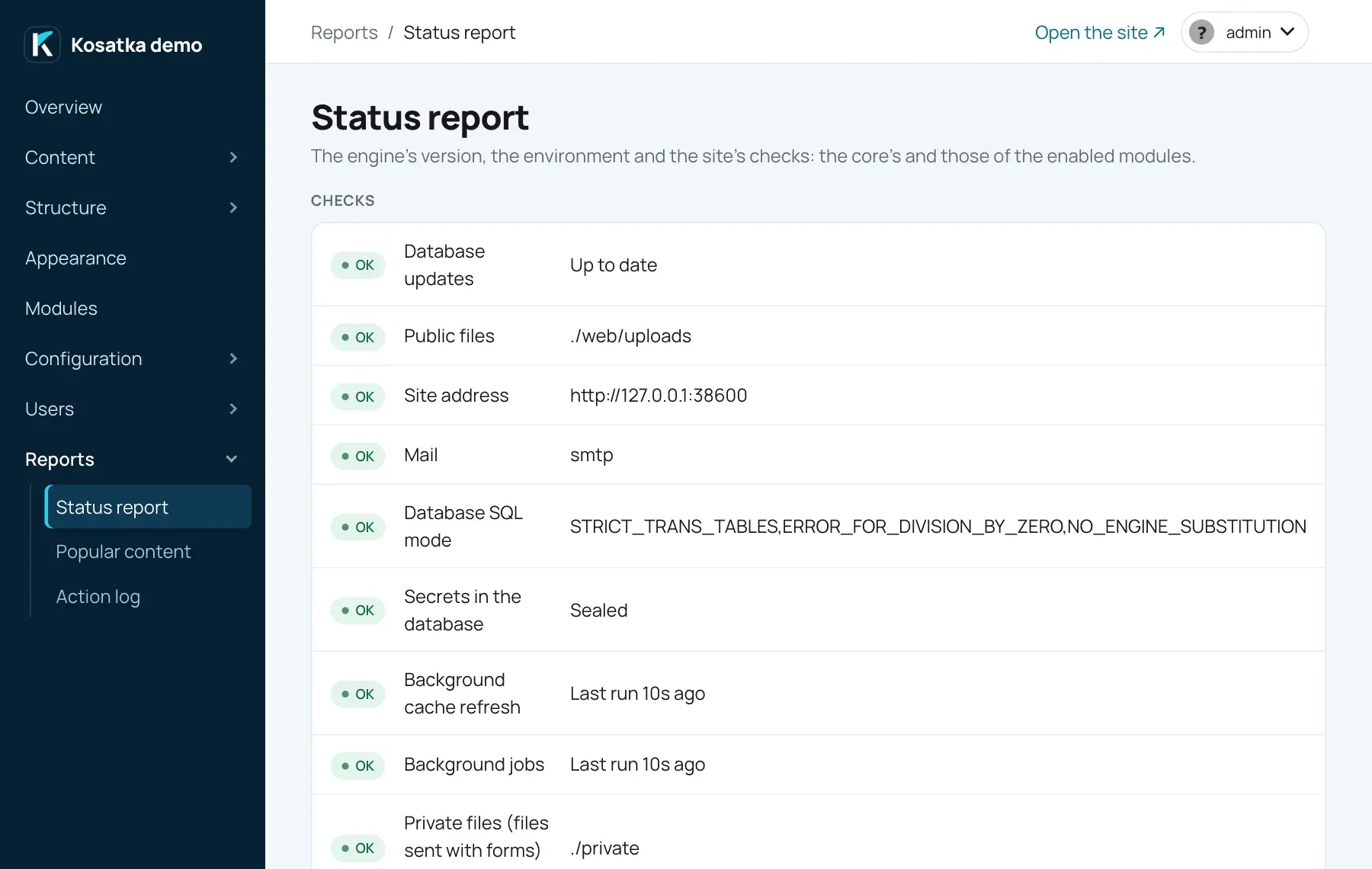
-
Upload an image and check it shows.
The service logs to standard output, one line per event
(level=INFO, level=WARN, level=ERROR …); systemd keeps it in the
journal:
journalctl -u kosatka@kosatka -fjournalctl -u kosatka@kosatka --since "1 hour ago" | grep -E 'level=(WARN|ERROR)'To send the log and the site’s metrics to Grafana, Elasticsearch or another monitoring system, see Monitoring.
9. Update the site
Section titled “9. Update the site”Migrations are built into the binary: the new binary brings the
database updates it needs, recorded in the schema_migrations table.
-
Build the new binary and the minified files (section 2).
-
Back up the database and the file directories (section 10).
-
Upload the static files, the templates, the themes and the binary (section 3).
-
On the server, see what the new binary would run, then run it:
Terminal window cd /opt/kosatkaset -a; . ./kosatka.env; set +aexport CONFIG_PATH=/opt/kosatka/prod.yaml./kosatka migrate # the plan./kosatka migrate -apply # apply itThe old binary keeps serving until the restart, and the new one reads its new columns as soon as it starts: a step that drops or changes a column, run before the restart, can break the old one for that moment. To leave no gap, run
./kosatka migrate -apply -additivebefore the restart (the steps the old binary is fine with: tables and columns added) and./kosatka migrate -applyafter it for the rest (columns dropped or changed).app migratecovers the core and every module that is enabled or installed. A module enabled for the first time on the Modules page installs itself; it needs no command. Seeapp migrate. -
Restart the service and check the status report shows no pending migrations:
Terminal window sudo systemctl restart kosatka@kosatka
During a long update you can turn on Maintenance mode
(/admin/config/maintenance): visitors get a maintenance page, while
users with the Access the site in maintenance mode permission
(administrators) can still sign in and work.
10. Backups
Section titled “10. Backups”Back up before every migration, and regularly. A backup is three things: the database and the two file directories. Content refers to the files by their paths, so keep the three from the same moment together.
The database: app backup dumps it
with the config’s connection and the database’s own tool (mysqldump
or pg_dump, from the client installed in section 1):
cd /opt/kosatkaset -a; . ./kosatka.env; set +aexport CONFIG_PATH=/opt/kosatka/prod.yaml
./kosatka backup kosatka-$(date +%F).sql.gz
Or by hand, on MySQL:
mysqldump --single-transaction --default-character-set=utf8mb4 \ -h 127.0.0.1 -u kosatka -p kosatka | gzip > kosatka-$(date +%F).sql.gzOn PostgreSQL:
pg_dump -h 127.0.0.1 -U kosatka -Fc kosatka > kosatka-$(date +%F).dumpThe files:
sudo tar -C /opt/kosatka -czf files-$(date +%F).tar.gz web/uploads privateThe image styles’ copies (web/uploads/styles/) and the previews of
images in texts (web/uploads/resize/) are made again when missing; you
can leave them out with --exclude. Files kept in a bucket (Files in
object storage) aren’t in these directories: back
them up with the storage’s own tools. Check a backup before you rely on
it: gunzip -t the dump and restore it now and then into a scratch
database. Keep copies off the server.
A CDN in front of the site
Section titled “A CDN in front of the site”A CDN or caching proxy in front of nginx can keep guests’ pages. Set
page_cache_max_age (or PAGE_CACHE_MAX_AGE) to the seconds it may keep
them. A guest’s page (a GET or HEAD answered with a 200 HTML page,
from a visitor without the user-session cookie, setting no cookie and
no Cache-Control of its own) then gets
Cache-Control: public, max-age=0, s-maxage=N: the CDN keeps it,
browsers ask again. Every other HTML answer without a Cache-Control of
its own gets private, no-store. 0, the default, leaves the answers
as they are.
Many CDNs don’t cache HTML unless a rule says so. Make the rule cache
GET and HEAD requests without the user-session cookie, outside
/admin and /api/, and follow the origin’s Cache-Control. The site
doesn’t purge the CDN when content changes: a guest sees an edit when
the cached page expires, so keep N short (a minute or a few).
Behind such a proxy nginx sees the proxy’s address, not the visitor’s.
Restore it with nginx’s real IP module in the site’s server block: the
proxy’s address ranges as trusted, and the header it puts the visitor’s
address in. For Cloudflare that is CF-Connecting-IP, with the ranges
published at https://www.cloudflare.com/ips/:
set_real_ip_from 173.245.48.0/20; # one line per range of the proxy# ...real_ip_header CF-Connecting-IP;real_ip_recursive on;$remote_addr, and so the X-Forwarded-For nginx passes on, is then
the visitor’s address. Keep the list of ranges up to date.
Docker in production
Section titled “Docker in production”The repository’s Dockerfile builds an image with the binary (the
minified files and the release number in it), web/ and themes/. It
runs as an unprivileged user on port 3333, configured by environment
variables (deploy/docker/config.yaml names them). On start it installs
a new site on an empty database (the administrator’s password is in the
log) and otherwise applies the pending migrations (app migrate -apply)
before serving. See Run in Docker. Each
release publishes the image as ghcr.io/kosatka-cms/kosatka, tagged
with its version (1.2.0), its minor line (1.2) and latest (see
Releasing); or build it yourself:
docker build -t kosatka:v1.2.0 .docker run -d --name kosatka --restart unless-stopped \ -p 127.0.0.1:3333:3333 \ --env-file /opt/kosatka/kosatka.env \ -v kosatka-files:/app/web/uploads \ -v kosatka-private:/app/private \ kosatka:v1.2.0kosatka.envhere holds every setting:DB_HOST,DB_NAME,DB_USER,DB_PASSWORD(for PostgreSQL alsoDB_DRIVER=postgresandDB_PORT=5432),SESSION_SECRET_KEY,SECRETS_KEY,SESSION_SECURE=true,PUBLIC_BASE_URL,PAGE_CACHE_MAX_AGE,TRUSTED_PROXIES, and for the first startSITE_NAME,SITE_LANGUAGE,ADMIN_NAME,ADMIN_EMAIL,MODULES.- nginx on the host reaches the container through Docker’s network, not
loopback: set
TRUSTED_PROXIESto that network (Docker’s bridge networks are in172.16.0.0/12by default), or every visitor gets the network gateway’s address. - Keep both file directories in volumes, or they are lost with the container. A bind mount must be writable by the image’s user (uid 10001).
- Each start applies the pending migrations, so a new image migrates the database as it starts: back up before you run it.
- nginx in front proxies everything to
127.0.0.1:3333(only thelocation /block above): the static and public files are inside the container, and the application serves them.
The image has the engine alone. A site with modules or a file storage from their own repositories puts its own binary on it, built from the site’s main package on the engine version the image has:
FROM golang:1.27-alpine AS buildWORKDIR /srcCOPY . .RUN CGO_ENABLED=0 go build -trimpath -o /out/kosatka .
FROM ghcr.io/kosatka-cms/kosatka:0.1.1COPY --from=build /out/kosatka /app/kosatka