
Themes
A theme is the look of a site: its templates, styles, images, block regions and interface strings. The engine works without one, on its own templates; a theme changes only what it needs to and takes the rest from the engine.
A theme is a directory
Section titled “A theme is a directory”Every theme is one self-contained directory under themes/, next to the
engine’s web/ (a site sharing the engine with other sites has its own
themes/ in its directory, see
Several sites on one server). It can live in a
repository of its own and be copied in as a whole:
themes/sand/├── theme.yaml the manifest: name, regions, settings, description├── templates/ templates that replace the engine's├── static/ CSS, images, screenshot, icon│ └── css/sand.css served at /static/themes/sand/css/sand.min.css└── translations/ └── ru.json the theme's strings in another language| Path | What |
|---|---|
theme.yaml |
the manifest: the theme’s name, its regions and default region, its settings, starter blocks, icon and description. A directory without a valid theme.yaml is not a theme |
templates/ |
templates with the same relative paths as the engine’s (header.html, teaser/default.html…) |
static/ |
static files, served at /static/themes/<theme>/… |
translations/<lang>.json |
the theme’s strings in other languages |
Only theme.yaml (with at least one region, or a base theme that has
them) is required.
Falling back to the engine
Section titled “Falling back to the engine”A template is looked up by its relative path, in this order:
- the active theme’s
templates/; - its base theme’s, if it is a subtheme (and that theme’s base, and so on);
- the engine’s own templates (
web/templates/); - the modules’ templates.
So a theme that has only header.html and partials/theme_head.html
gets the engine’s layout, pages, teasers and forms, with its own header
and styles. To change any other page, put a file with the same path in
the theme. The same goes for strings: a theme’s catalog is read before
the engine’s and the modules’.
The engine’s own templates are listed on the Appearance page as the theme Base: plain Bootstrap 5, light or dark as the visitor’s device is. Every theme falls back to them.
The bundled themes
Section titled “The bundled themes”| Directory | Name | What it is |
|---|---|---|
themes/kosatka |
Kosatka | the engine’s default theme and the look of a new site (app install): lists in rows of glass with covers, a pinned item (Sticky at the top of lists) leading as a large card, a reading column, a dark (by default) and a light scheme in an accent colour |
It keeps the engine’s regions (header, sidebar, content_top,
content_bottom, content_inline, footer, footer_bottom), so blocks
stay where they are when you switch themes. It overrides only
header.html, footer.html and partials/theme_head.html and styles
the engine’s markup with its own CSS: a good example to read before
writing a theme.
Other themes live in their own repositories and are installed with
app theme add (Distributing a theme) - among them
Respawn, a light portal of news and reviews, C64, the Commodore 64’s
screen, and Terminal, a technical blog in a terminal; the themes
catalog shows them all with
their screenshots.
Choosing a theme
Section titled “Choosing a theme”The admin’s Appearance page (/admin/config/appearance)
lists the engine’s templates and every directory under themes/ with a
valid theme.yaml, each with its screenshot, version, description,
author and tags. The active theme comes first.
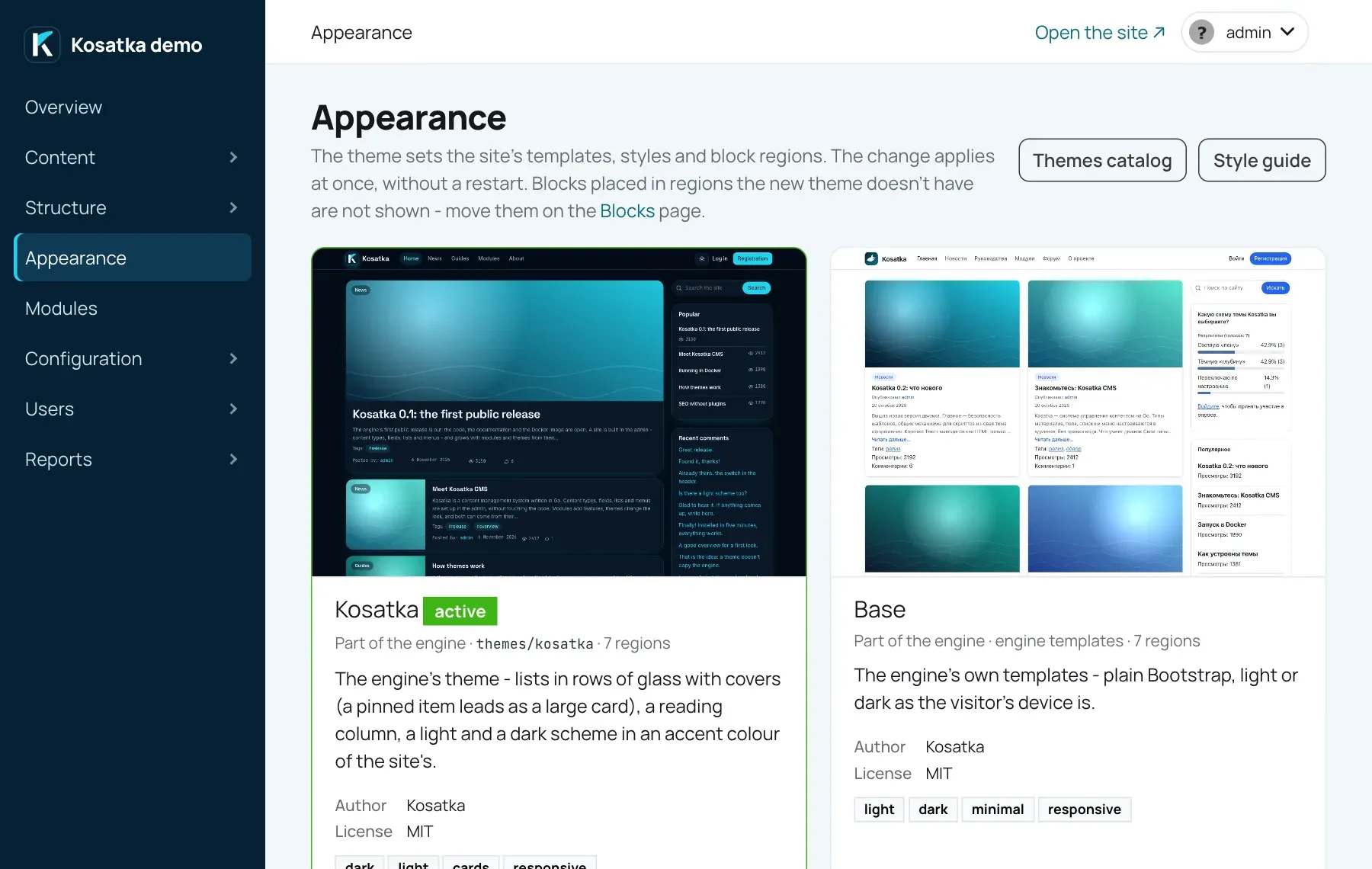 A directory whose
theme.yaml is missing or fails a check is
named above the list, with the error.
- Set as default makes a theme the site’s. The change applies at once, without a restart.
- Preview shows the site in a theme to you alone: you see your site with its content, the visitors keep the active theme. The admin bar then has buttons to activate the theme or to leave the preview.
- Settings opens the theme’s options
(
/admin/config/appearance/theme/<theme>), if its manifest declares any. - Style guide (
/admin/config/appearance/styleguide) shows headings, buttons, forms, tables and a list of cards as the theme renders them.
Each theme has its own block layout: the Blocks page has a tab per theme, so a theme can be arranged before it is switched on. A theme that has no layout yet gets a copy of the current theme’s blocks in the regions with the same IDs, plus the starter blocks its manifest lists. See Blocks and regions.
Until a theme is chosen in the admin, the config’s theme / THEME
applies (a directory name under themes/; empty - the engine’s
templates). A site made by app install has a theme chosen already:
kosatka, unless its -theme or demo set names another.
See the configuration.
The admin pages (/admin/…) have a look of their own: a theme doesn’t
change them.
Where to go next
Section titled “Where to go next”- Create a theme - a first theme, step by step.
- The manifest - every key of
theme.yaml. - Templates - the engine’s templates, suggestions, the data and functions templates get, debugging.
- Styles, images and translations - CSS, scripts, icons, the theme’s strings.
- Distributing a theme - a theme in its own repository, releases, the themes catalog, testing.
- A theme’s demo site - the site of the screenshot, installed with one command.