
Content model
Every piece of content - an article, a page, a poll, a form - is a
content item: a row of nodes (entity.Node in the code). Its
type decides which fields it has; the values of those fields live in
tables of their own, one per kind of value. This page shows the tables
and what the engine does with an item from its first save to its
deletion. For how a site builder sees the same things, see
Content types and fields.
These are the engine’s tables as they are now, not an interface: their columns change with the engine’s migrations. A module reads and changes content through the SDK’s services (see In a module); SQL reports and imports should expect the schema to move with the engine’s releases.
The tables
Section titled “The tables”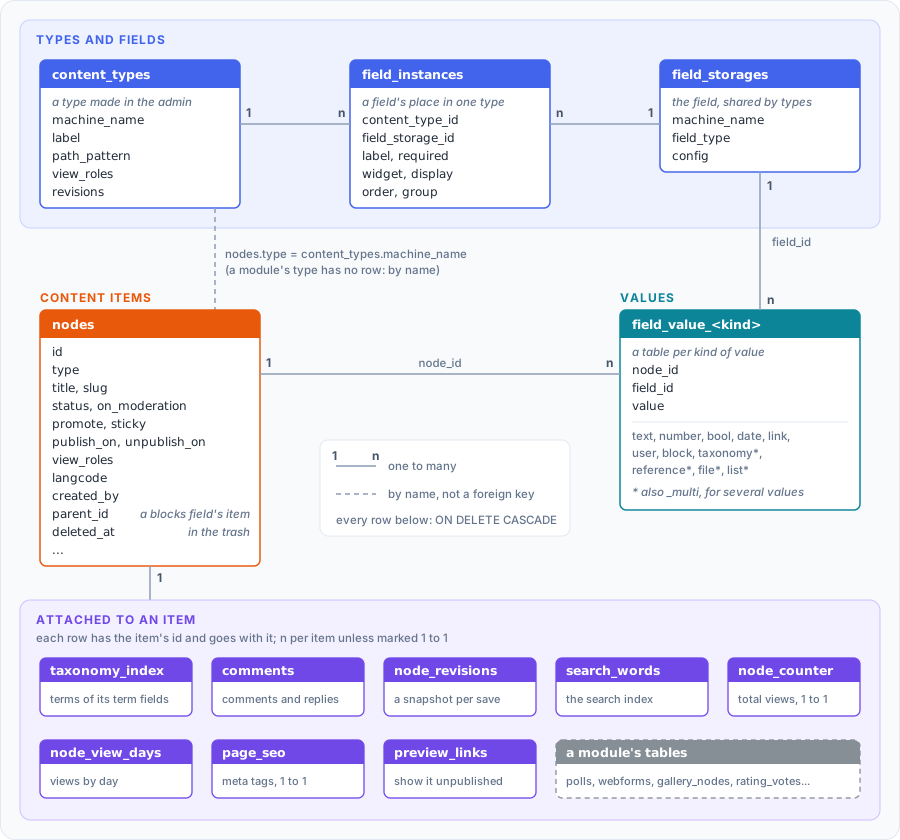
Every table that hangs off nodes references it with ON DELETE CASCADE: deleting the row deletes the rest. The one exception is a
reference field’s target (field_value_reference.target_node_id): an
item pointing at another one isn’t deleted with it, its value is.
A content type created in the admin is a row of content_types:
its address pattern, comment and publishing defaults, who may view it
(view_roles - a closed section), whether it keeps revisions. A
module’s type (a poll, a form) has no row there: the module
declares it in its manifest (NodeTypes) and keeps its data in its own
tables. Either way nodes.type holds the type’s machine name.
Fields and values
Section titled “Fields and values”A field has two parts. Its storage (field_storages) is the field
itself: a machine name unique on the site, its kind (field_type) and
the settings every type that uses it shares (config: a text’s
maximum length, the vocabulary of a term field, a list’s values…).
Its instance (field_instances) is its place in one type: the
label, whether it is required, the widget, how it is shown, its order
and group in the form. Attaching an existing field to another type adds
an instance, not a second field - the values of both types are in the
same table, under the same field_id.
Values are in typed tables, field_value_<kind>: node_id, field_id
and the value in a column of its type - text with its text format, a
number, a date, a term’s, a file’s or another item’s id. A field with
several values uses the _multi table of its kind. Each table is read
and written by one store (ent/database/field_store_*.go), registered
for the field types it keeps (registerFieldStorage): adding a kind of
value is a store, not a change of the repository.
A blocks field holds items of its own: each block (a text, a
quote, a gallery of a field set) is a node too, with parent_id set to
the item holding it and a row in field_value_block (item_id, its
delta - the order). They aren’t content of their own: every node
query leaves them out (see below).
Saving an item
Section titled “Saving an item”The content form (DynamicContentController, /create/{type},
/node/{id}/edit) saves everything in one transaction: a failure
anywhere leaves the item as it was (or no item, on create).
- What reading the form only noted is written first: new terms typed into a term field, alt texts of images.
- The
nodesrow and the field values (DynamicContentRepository): each store replaces the item’s values of its fields; a blocks field’s items are saved as nodes of their own first. - The search index (
search_words): the words of the title and of the text fields, in the item’s language (langcode, the site’s when the item has none). - The meta tags (
page_seo), when the user may set them. taxonomy_index: rebuilt from all the item’s term fields - term pages, related lists and Views filters read it, not the fields.- The modules’ parts: the settings sections they add to the form
(
modulekit.AddNodeSettings), an editorial workflow’s transition (SetNodeWorkflow- it then decides the item’s publishing), and the calls ofmodulekit.OnNodeFormSaved. - The history (
NodeRevisionService): for a type that keeps revisions, a snapshot of the item and its values; an item that becomes public is announced toOnNodePublished; what changed of its status, author or address goes to the action log. - A changed address: the old one redirects to the new one
(
redirects).
After the transaction, a change of who may view the item makes the engine read who views what again and render the cached blocks anew.
A module that changes an item outside the form wraps the change in
modulekit.ChangeNode: it gets the same transaction, revision and
announcement.
Publishing
Section titled “Publishing”status- published or not;on_moderation- waiting for approval (/admin/moderation);promoteandsticky- on the front page and pinned at the top of lists.publish_on,unpublish_on- the schedule: a background job (ScheduledPublishing) publishes and unpublishes items when their time comes.- A type an editorial workflow handles is published by the workflow’s
transitions only (
service.PublishingManaged): its form has no publish checkbox, the bulk actions and the publish route leave its items out, a schedule set before it joined is cleared. preview_links- a link that shows an unpublished item to whoever has it, for a week.
Addresses
Section titled “Addresses”An item’s address is its slug, unique on the site. With path_auto
the slug comes from its type’s path_pattern (tokens such as the title
or a term, NodePathService); otherwise the editor types it. A
module’s type may put its items under a prefix of its own (the
manifest’s PathPrefix). /node/<id> redirects to the address, and an
address that changed keeps redirecting.
Reading and access
Section titled “Reading and access”The Node schema’s interceptor adds its conditions to every node query,
so no list, count, feed or search forgets them. It leaves out a blocks
field’s items, the items in the trash and what the request’s visitor
may not view - a closed type (content_types.view_roles) or an item
restricted to other roles (nodes.view_roles). The details and the
ways around it for the engine’s own lookups are in
Rows every query leaves out.
Deleting an item
Section titled “Deleting an item”Every deletion goes through NodeDeleteService - the form, the bulk
actions, a module’s uninstall:
- An item of an admin type goes to the trash first:
deleted_atanddeleted_byare set, and the interceptor hides it. A background job deletes it for good aftertrash_days(30 by default), or an editor restores it or empties the trash. A module’s type has no trash: its items are deleted for good at once. - Deleting for good collects the item’s files (file fields and the
modules’
NodeFiles), then, in one transaction, clears the references to it and deletes itsnodesrow - everything else goes with it by cascade. The files nothing else uses are deleted after, and the action log records the deletion.
In a module
Section titled “In a module”- A table of the module’s that belongs to an item has the item’s id
and a foreign key to
nodeswithON DELETE CASCADE(in its ent schema, a stand-in for the core’s table -schemakit.Table("nodes")): deleting the item deletes its rows, with nothing to register. - Files in the module’s tables that belong to an item are declared in
the manifest (
NodeFiles), so deleting the item deletes them too. - The core’s tables aren’t part of the SDK: read and change items
through its services (
Nodes,NodeRepo,ChangeNode), so the search index, the history and the caches follow. See The module SDK.